
HOW TO PLACE AN ORDER & PAY WITH BITCOIN
HOW TO ORDER YOUR PEPTIDES
Welcome! This guide walks you through placing an order and paying securely with Crypto currency like Btc, Eth, USDT. We accept Crypto Currency payments manually for fast, private processing. Use coupon code UT2026 for free shipping + 15% off orders over $500. All products are for research use only (18+ only).
Place Your Order (Takes 2–3 minutes)
- Visit our Shop page: https://utherpeptidess.com/shop/
- Browse categories (Peptide Blends, Melanotan, Cosmetic Peptides, Bioregulators).
- Click on any product to view details and price.
- Choose quantity and click Add to Cart.
- Click the Cart icon (top right) to review your items.
- Click Proceed to Checkout.
- Fill in your shipping and billing details.
- Submit the order.
Done! Your order is reserved once submitted.
Pay with Bitcoin Using Cash App (Recommended for US users)
After you receive your BTC address and amount:
- Open the Cash App on your phone.
- Tap the Bitcoin tab (bottom menu).
- Tap Buy to purchase the exact BTC amount you need (use your bank/card or existing balance).

How to Buy Bitcoin on Cash App (INSTANTLY)
- Go back to Bitcoin tab → tap the send arrow (or "Send Bitcoin").
- Paste the BTC address we provided (double-check it!).
- Enter the exact amount (in BTC).
- Choose withdrawal speed (Priority = fastest) and confirm.
- Send! You will receive a transaction ID.
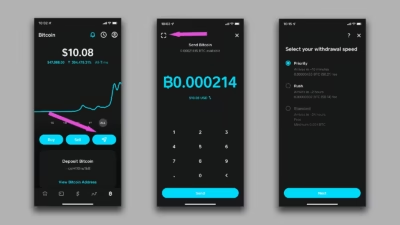
How to buy, sell and send Bitcoin on Cash App
Important:
- Use the Bitcoin network only (not Lightning).
- Include any network fee shown.
- Send exact amount (we match to the satoshi).
- Once confirmed (usually 10–60 mins), our team ships your order.
Pay with Bitcoin Using Card
Prefer to pay with credit/debit card? Use these trusted on-ramp services (instant BTC purchase):
- Go to https://www.moonpay.com/buy
- Select Buy Crypto → choose Bitcoin.
- Enter card details and amount.
- Verify your identity.
- Receive BTC in your temporary Moonpay wallet.
- Send it to our BTC address (copy-paste carefully).